Regime-shift detection
Combines volume-profile imbalance and momentum delta to color the chart by regime — accumulation, expansion, distribution.
Flag regime shifts, order blocks, and liquidity sweeps before the move. Built for 1H–1D — works inside the day too.
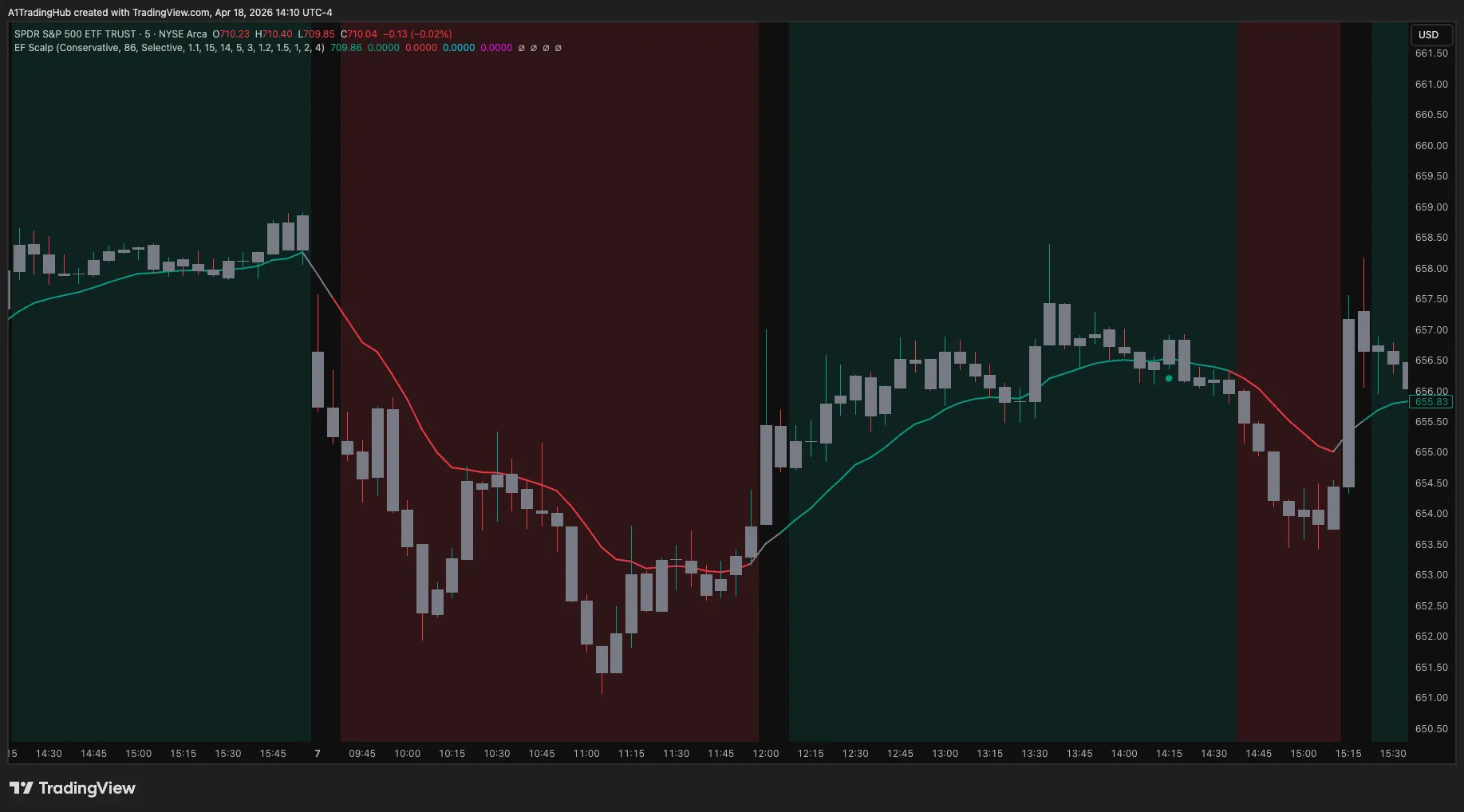
Edge Finder reads the regime before you take the trade. It combines volume-profile divergence, structure breaks, and adaptive trend bands to flag when the market is shifting from accumulation to expansion — and where smart money is hunting stops. Built for swing and position trading on 1H–1D, but tunable for intraday futures and 0DTE options.
Each feature below has its own anchor link so you can deep-link from your notes, Discord, or another article.
Combines volume-profile imbalance and momentum delta to color the chart by regime — accumulation, expansion, distribution.
Auto-marks bullish and bearish order blocks with mitigation levels so you know where price is most likely to react.
Flags equal-highs/lows sweeps in real time — alerts fire on close so you can fade or follow with confidence.
Adaptive bands widen and contract with realized volatility, giving an instant read on trend health vs. mean reversion.
On-chart stats panel shows hit rate, average R, and largest drawdown for the current symbol and timeframe.
All key events (regime shift, order-block tap, sweep) ship to Discord via TradingView's native webhook.
Edge Finder is symbol-agnostic. Below are the markets we actively trade and have tuned the defaults for.
| Asset Class | Symbols |
|---|---|
| Futures | ES, NQ, RTY, CL, GC |
| Options | SPY, QQQ, SPX (0DTE-friendly) |
| Forex | EURUSD, GBPUSD, USDJPY, XAUUSD |
| Crypto | BTC, ETH, SOL |
| US Equities | AAPL, NVDA, TSLA, MSFT, META |
Everything you need to set up, run, and trade with Edge Finder — written by the Scalping-Algo desk.
The Edge Finder is a premium TradingView regime and order-block indicator, engineered to provide traders with a decisive edge in identifying high-probability market shifts and trading opportunities. At its core, the indicator simplifies complex market dynamics into a clear, actionable framework. It's built on a sophisticated algorithm that analyzes market structure, volume, and momentum to define the prevailing market 'regime'—be it expansion, retracement, or consolidation. This is achieved through a proprietary blend of volume profile analysis, which identifies imbalances between buying and selling pressure, and a momentum delta calculation that confirms the strength and direction of a potential move. The result is a color-coded dashboard on your chart, instantly telling you the market's current state and bias, allowing you to align your trades with the dominant flow.
A key feature is its automated order block detection. Manually identifying valid order blocks is a subjective and time-consuming process. The Edge Finder removes the guesswork by programmatically scanning for and highlighting significant zones where institutional order flow has previously created a strong price imbalance. These auto-marked order blocks serve as powerful, objective points of interest for potential entries or targets. The algorithm validates these zones by analyzing the shift in market structure that follows their formation, ensuring only the most probable blocks are displayed.
Furthermore, the indicator excels at liquidity sweep detection. It automatically flags instances where price engineers liquidity by running obvious highs or lows before a major reversal. This is often the 'signature' of smart money accumulating positions. By alerting you to these sweeps in real-time, especially when they occur near a key order block, the indicator provides a powerful confluence for trade entries. Finally, adaptive trend bands dynamically adjust to market volatility, providing a visual guide for the expected range of price action within the current regime. These bands help traders set more intelligent stop losses and take-profit targets, framing the risk and reward of a potential setup.
To unlock the full potential of the Edge Finder, it's crucial to tailor its settings to your specific trading style and chosen market. The indicator is designed for flexibility, allowing you to fine-tune its sensitivity for everything from intraday scalping to long-term swing trading. The 'Lookback Window' setting, for example, determines the period the algorithm analyzes to calculate the current regime. For swing trading on higher timeframes like the 1H, 4H, or 1D, a longer lookback window (e.g., 20-30 periods) is recommended to focus on more significant structural shifts. Conversely, for fast-paced intraday futures trading, a shorter lookback (e.g., 10-14 periods) will provide more responsive regime signals.
The 'Order Block Sensitivity' adjusts the criteria for what qualifies as a valid order block. A higher sensitivity setting will mark more zones, including smaller, less significant ones, which might be useful for scalpers. A lower sensitivity, our recommended starting point for most traders, filters for only the most potent, high-volume order blocks, reducing chart noise and focusing your attention on A-tier setups. Similarly, the 'Sweep Tolerance' setting allows you to define how precisely a high or low must be run for it to be flagged as a liquidity sweep. A tighter tolerance demands a more picture-perfect sweep, while a looser setting will catch broader, less defined liquidity grabs.
Finally, 'Regime Smoothing' helps to filter out minor fluctuations within a larger trend. A higher smoothing factor will result in fewer, but more confirmed, regime shifts. This is ideal for swing traders who want to capture the primary trend and avoid getting shaken out by minor pullbacks. For day traders, a lower smoothing factor provides earlier signals but may be more susceptible to whipsaws. We recommend starting with the default values for your chosen timeframe (e.g., 'Swing 1H/4H/1D' preset) and gradually adjusting one variable at a time as you gain experience with the indicator's behavior in your preferred markets, whether it's ES futures, gold futures, or various crypto assets.
Let's walk through a concrete example of a high-probability swing trading setup on ES futures (E-mini S&P 500) using the Edge Finder. The setup begins on the 1-hour chart, where the market has been in a prolonged consolidation regime, indicated by the 'Blue' neutral regime color on the indicator dashboard. We are patiently waiting for a clear sign of directional bias. The first clue appears as the Edge Finder's regime detection algorithm prints a 'Green' signal, indicating a bullish regime shift. This tells us that the underlying dynamics, driven by a combination of volume profile divergence and positive momentum delta, have shifted in favor of buyers. This alert prompts us to begin actively looking for a long entry.
Following the regime shift, price begins a shallow pullback. As it does, we observe that the indicator has automatically marked a fresh bullish order block just below the current price. This zone represents a key area of institutional sponsorship where we anticipate buyers will step in again. Our trade plan is to enter a long position on a tap of this order block. Price slowly drifts down and taps into the upper boundary of the marked zone. We take our entry here, adhering to our plan. This disciplined approach prevents chasing price and ensures a favorable entry point.
With our entry secured, we turn to risk and trade management. The Edge Finder's adaptive trend bands provide a logical location for our stop loss. We place our stop just below the lower trend band and the low of the order block, giving the trade room to breathe while defining our maximum risk. Our target is a prior high where liquidity is resting, which also aligns with the upper adaptive trend band. As the bullish regime continues, price expands upward, breaking the previous market structure and ultimately hitting our take-profit target for a successful trade. This example showcases how combining the regime shift, an order block tap, and adaptive bands creates a complete, rules-based trading plan for swing trading TradingView charts.
The Edge Finder's principles are universal across markets, and it's particularly effective on volatile assets like Bitcoin. Here's a typical BTC swing trade setup on the 4-hour chart that combines multiple indicator concepts for a high-conviction entry. First, we identify that the market is in a bearish 'Red' expansion regime, signaling that sellers are in control. Price has been making a series of lower lows and lower highs. We are looking for a short entry opportunity that aligns with this dominant trend flow. During a corrective rally, price moves up towards a previously identified area of interest.
As price approaches a clear swing high on the chart, we get an alert from the Edge Finder: 'Liquidity Sweep Detected'. The indicator flags that price has just wicked above the old high, grabbing buy-stop liquidity that was resting there, before immediately showing signs of rejection. This is a classic smart-money maneuver designed to trap breakout traders before reversing. This sweep provides the first major confluence for our short setup. It's the 'catalyst' we were waiting for.
Almost simultaneously, the sweep occurs directly into a bearish order block that the indicator had automatically marked from a previous down-move. This is our second, and most critical, confluence. The regime is bearish, liquidity has been engineered, and price has tapped a key institutional supply zone. We enter short as the candle that performed the sweep closes back below the old high. Our stop loss is placed decisively above the high of the sweep wick. Our target is the next major swing low. The combination of a bearish regime, a confirmed liquidity sweep, and a tap of a verified order block creates the A+ setup we look for. This BTC swing trade is a prime example of how the indicator layers information to build a compelling trading narrative.
To ensure you never miss a critical market event identified by the Edge Finder, the indicator is equipped with a comprehensive and fully customizable alert system within TradingView. You can create alerts for every key signal the indicator generates. This includes 'Regime Shift' alerts (e.g., Neutral to Bullish), 'Order Block Tap' alerts (when price enters a marked OB), and 'Liquidity Sweep' alerts. Setting them up is simple: click the 'Add Alert' button on your TradingView chart, select 'Edge Finder' as the condition, and choose the specific event you want to be notified about. You can receive these notifications via pop-up, email, or push notification to your mobile app, allowing you to stay connected to the markets without being glued to your screen.
For traders who want to integrate signals into a broader ecosystem, the Edge Finder supports a 'Webhook URL' option in TradingView alerts. This feature is incredibly powerful for automation. You can send detailed alert information directly to a third-party platform like Discord, a custom trading bot, or an analytics dashboard. When an alert is triggered, TradingView sends a JSON payload to your specified webhook URL. This payload contains structured data about the event, such as the asset, the timeframe, the price at which the alert triggered, and the specific signal type (e.g., 'Bullish Regime Shift' or 'Bearish OB Tapped').
For example, a Discord webhook can be configured to post a message to your private server instantly, detailing the setup. This allows you and your trading group to immediately analyze the opportunity. For advanced users, this JSON data can be parsed by a script or bot to trigger automated order execution through a broker's API, although this requires significant technical expertise and a thorough understanding of the associated risks. This automation capability transforms the Edge Finder from a purely visual tool into the central nervous system of a sophisticated trading workflow, saving time and enabling systematic execution.
The Edge Finder indicator is built exclusively for the TradingView platform. Its sophisticated Pine Script code leverages TradingView's powerful charting engine and server-side alert infrastructure, which are essential for its real-time calculations and notifications. Therefore, a TradingView account (including the free plan) is required to use the indicator. It is not compatible with other platforms such as MetaTrader (MT4/MT5), NinjaTrader, or proprietary brokerage platforms. This focus on a single platform ensures that we can provide the most robust, deeply integrated, and well-supported tool possible without compromise.
While it operates only on TradingView, the Edge Finder is completely broker-agnostic. This means you can use it to analyze charts and generate signals, and then place your trades with any brokerage of your choice. The indicator simply provides the analysis; the execution is up to you. This separation gives you the freedom to choose a broker that best fits your needs regarding fees, execution speed, and customer support. The analysis and signals are identical regardless of which broker's data feed you are using on TradingView (e.g., OANDA, Binance, Coinbase).
The Edge Finder is designed to be a universal tool applicable across all asset classes. Its principles of market structure, volume, and momentum are not specific to any single market. We have traders successfully using it on a wide range of instruments, including: ES futures and other major indices, gold futures and commodities, forex major and minor pairs, individual stocks, and, of course, cryptocurrencies like Bitcoin (BTC swing trading) and Ethereum. As a premium TradingView regime and order-block indicator, its strength lies in its adaptability to different market dynamics and timeframes, making it a versatile tool for any serious trader's arsenal.
Access to the Edge Finder indicator, along with our exclusive trading community, is managed through the Whop platform. We offer several subscription tiers to fit different commitment levels and budgets. You can choose from a flexible monthly subscription, a discounted yearly plan for a longer-term commitment, or a lifetime access package for a one-time fee, which grants you permanent access to the indicator and all future updates. This tiered structure allows you to select the plan that makes the most sense for your trading journey. All payments and subscription management are handled securely through Whop, providing a seamless and professional user experience.
Upon subscribing, you will receive immediate access to the Edge Finder on TradingView. You will also receive an invitation to join the official Scalping-Algo Discord community. This community is a core part of the Edge Finder experience, led by founder Andy Tran (@Uncle_the_shooter). It's a professional environment where traders share trade ideas, discuss chart analyses using the indicator, and help each other grow. You'll find dedicated channels for different asset classes (like ES futures and BTC swing trades), strategy discussions, and direct support from our team. This community aspect provides invaluable context and continuous learning, helping you master the indicator much faster than you would on your own.
We stand by the quality of our tools and want you to be completely satisfied. Monthly plans include a 7-day money-back guarantee from the date of your initial purchase — ample time to apply the indicator to your charts, test its features, and see firsthand the edge it can provide. If you determine within that first week that it is not the right fit, you can request a full refund, no questions asked. Yearly and lifetime plans are final sale and non-refundable, so we recommend starting on the monthly plan if you would like the refund window.
The Edge Finder is our flagship indicator for systematic swing trading, but it’s part of a larger ecosystem of tools and knowledge designed to empower discretionary traders. To enhance your analysis, consider our /indicators/smart-scalping-signals for identifying rapid, momentum-based entries on lower timeframes. For a deeper understanding of market momentum, our /indicators/momentum-oscillator provides a nuanced view of buying and selling pressure. For traders seeking a comprehensive, all-in-one solution, the /algo-master bundle combines our premium indicators into a single, integrated suite. To learn the core principles behind our tools, visit our /methodology page, which breaks down concepts like order flow and market structure. Finally, stay updated with market analysis and trading tips on our /blog.
These resources work together to provide a holistic approach to trading. By combining the macro-level insights from the Edge Finder with the precision of our other tools and the foundational knowledge from our methodology, you can build a robust and well-rounded trading system. We encourage you to explore these pages to see how the full Scalping-Algo suite can help you gain a more complete understanding of the markets and refine your unique trading edge.
Get instant access to Edge Finder plus our full indicator suite, Discord alerts, and a community of 2,000+ active traders.